コンテキストメニューをインターフェースに合わせて切り替え表示
MyDummySQLProに、ショートカットメニューをつけてみました。
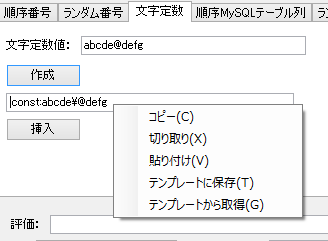
主に、テキストボックスに入っているスクリプトをテンプレートに保存するためのメニュー項目をつけたかったからです。
AccessSavableTextBoxは継承させたかったので、またまたインターフェースでクラス(オブジェクト)を識別認識させています。
IHasCategorizedTextAndContextMenuインターフェースを実装したテキストボックス:TextBoxForTemplate
namespace MyDummySQL.ControlsForTemplate
{
    public class TextBoxForTemplate : AccessSavableTextBox, IHasCategorizedTextAndContextMenu
    {
        private string categoryName = "dummy";
        public string CategoryName {
            get
            {
                if (this.Parent != null && "dummy".Equals(this.categoryName))
                {
                    return this.Parent.Text;
                }
                return this.categoryName;
            }
            set
            {
                this.categoryName = value;
            }
        }

        public TextBoxForTemplate()
            : base()
        {
            this.ContextMenuStrip = (new ContextMenuBuilderFactory()).Create(this).Build();
        }
        public TextBoxForTemplate(string categoryName) : base()
        {
            this.categoryName = categoryName;
            this.ContextMenuStrip = (new ContextMenuBuilderFactory()).Create(this).Build();
        }


    }
}
今回インターフェイスは2種あります。
一つ目、ふつうの「コピー」「切り取り」「貼り付け」しかないコンテキストメニューを表示させるテキストボックス用:IHasTextAndContextMenu
namespace MyDummySQL.ControlsForTemplate
{
    public interface IHasTextAndContextMenu
    {
        string Text { get; set; }
        string SelectedText { get; set; }
        //System.Windows.Forms.ContextMenuStrip ContextMenuStrip { get; set; }
    }
}
二つ目、一つ目のメニューに加えて「テンプレートに保存」「テンプレートから取得」のメニュー項目も表示するテキストボックス用:
namespace MyDummySQL.ControlsForTemplate
{
    public interface IHasCategorizedTextAndContextMenu : IHasTextAndContextMenu
    {
        string CategoryName { get; set; }
    }
}
次に、メニューを作成するクラスを、インターフェースで切り替え生成するファクトリ:ContextMenuBuilderFactory
namespace MyDummySQL.ControlsForTemplate
{
    public class ContextMenuBuilderFactory
    {
        public ContextMenuBuilderFactory() { }

        public ContextMenuBuilder Create(IHasTextAndContextMenu control)
        {
            return new ContextMenuBuilder(control);
        }

        public ContextMenuBuilder Create(IHasCategorizedTextAndContextMenu control)
        {
            return new ContextMenuBuilderWidthCategory(control);
        }
    }
}
次に実際に普通のメニューを作成する”自称ビルダー”(注:ビルダーパターンではないです):ContextMenuBuilder
namespace MyDummySQL.ControlsForTemplate
{
    public class ContextMenuBuilder
    {
        //ContextMenu
        protected ContextMenuStrip cMenu = new ContextMenuStrip();

        protected IHasTextAndContextMenu HasText = null;

        public ContextMenuBuilder(IHasTextAndContextMenu control)
        {
            this.HasText = control;
        }

        virtual public ContextMenuStrip Build()
        {
            //this.HasText = control;
            /*
            this.BuildCopy();
            this.BuildCut();
            this.BuildPaste();
             */
            this.BuildBasicMenu();
            return this.cMenu;
        }

        private void BuildBasicMenu()
        {
            this.BuildCopy();
            this.BuildCut();
            this.BuildPaste();
        }

        virtual protected void BuildCopy()
        {
            //Copy
            ToolStripMenuItem mCopy = new ToolStripMenuItem();
            mCopy.Text = "コピー(&C)";
            mCopy.Click += delegate
            {
                if (!string.IsNullOrEmpty(this.HasText.SelectedText))
                {
                    Clipboard.SetText(this.HasText.SelectedText);
                }
                else if (!string.IsNullOrEmpty(this.HasText.Text))
                {
                    Clipboard.SetText(this.HasText.Text);
                }
            };
            this.cMenu.Items.Add(mCopy);
        }

        virtual protected void BuildCut()
        {
            //Cut
            ToolStripMenuItem mCut = new ToolStripMenuItem();
            mCut.Text = "切り取り(&X)";
            mCut.Click += delegate
            {
                if (!string.IsNullOrEmpty(this.HasText.SelectedText))
                {
                    Clipboard.SetText(this.HasText.SelectedText);
                    this.HasText.SelectedText = "";
                }
                else if (!string.IsNullOrEmpty(this.HasText.Text))
                {
                    Clipboard.SetText(this.HasText.Text);
                    this.HasText.Text = "";
                }
            };
            this.cMenu.Items.Add(mCut);
        }

        virtual protected void BuildPaste()
        {
            //Paste
            ToolStripMenuItem mPaste = new ToolStripMenuItem();
            mPaste.Text = "貼り付け(&V)";
            mPaste.Click += delegate
            {
                if (!string.IsNullOrEmpty(this.HasText.SelectedText))
                {
                    this.HasText.SelectedText = Clipboard.GetText();
                }
                else
                {
                    this.HasText.Text = Clipboard.GetText();
                }
            };
            cMenu.Items.Add(mPaste);
        }

    }
}
さらに上のクラスを継承して、「テンプレートに保存」「テンプレートから取得」メニューを追加する”自称ビルダー”:ContextMenuBuilder
(ただし、テンプレート保存・取得の実装プログラムはまだ作っていませんので、仮です)
namespace MyDummySQL.ControlsForTemplate
{
    public class ContextMenuBuilderWidthCategory : ContextMenuBuilder
    {
        //private IHasCategorizedTextAndContextMenu HasCategorizedText = null;

        public ContextMenuBuilderWidthCategory(IHasCategorizedTextAndContextMenu control)
            : base(control)
        {
            this.HasText = control;
        }

        public override ContextMenuStrip Build()
        {
            this.cMenu = base.Build();
            BuildAddToTemplate();
            BuildGetFromTemplate();

            return this.cMenu;
        }

        virtual public void BuildAddToTemplate()
        {
            //Copy
            ToolStripMenuItem mToTemp = new ToolStripMenuItem();
            mToTemp.Text = "テンプレートに保存(&T)";
            mToTemp.Click += delegate
            {
                string template = string.Empty;
                string category = string.Empty;

                if (!string.IsNullOrEmpty(this.HasText.SelectedText))
                {
                    template = this.HasText.SelectedText;
                }
                else if (!string.IsNullOrEmpty(this.HasText.Text))
                {
                    template = this.HasText.Text;
                }

                IHasCategorizedTextAndContextMenu obj = this.HasText as IHasCategorizedTextAndContextMenu;
                if (obj != null)
                {
                    category = obj.CategoryName;
                }

                frmAddTemplates addFrm = new frmAddTemplates(category, template);
                addFrm.Show();

            };
            this.cMenu.Items.Add(mToTemp);
        }
        virtual public void BuildGetFromTemplate()
        {
            //Copy
            ToolStripMenuItem mFromTemp = new ToolStripMenuItem();
            mFromTemp.Text = "テンプレートから取得(&G)";
            mFromTemp.Click += delegate
            {
                string template = string.Empty;
                string category = string.Empty;

                if (!string.IsNullOrEmpty(this.HasText.SelectedText))
                {
                    template = this.HasText.SelectedText;
                }
                else if (!string.IsNullOrEmpty(this.HasText.Text))
                {
                    template = this.HasText.Text;
                }

                IHasCategorizedTextAndContextMenu obj = this.HasText as IHasCategorizedTextAndContextMenu;
                if (obj != null)
                {
                    category = obj.CategoryName;
                }

                frmTemplates frmTemp = new frmTemplates();
                frmTemp.Show();

            };
            this.cMenu.Items.Add(mFromTemp);
        }

    }
}
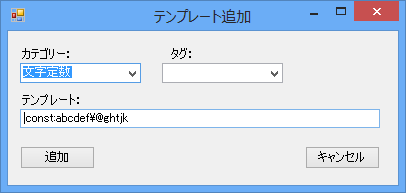
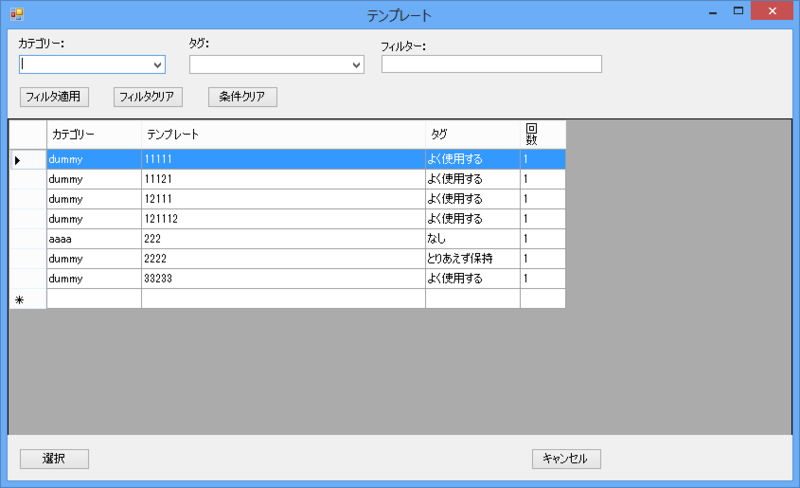
テンプレート関連を扱うフォームは以下のような感じです。
・・・つ、疲れた。また来週〜。
